Configuring Data Filling Rules
Before training occurs, the data that is designated as inputs to the training process must be filled if necessary. As each hour is imported into the system, filling rules are applied first, followed by validation rules.
Data filling settings must be associated with a particular Input Item Type (Ordinal or Categorical). If provided, the Input data filling parameters will be used to fill in the entry for an hourly interval when the hourly interval is missing from the import file. Missing hours will be filled with a placeholder with no value by the import process.
The import process detects missing hours by using the defined beginning and ending range in the import file. The adding of placeholder values during the import ensures a continuous stream of hourly data for the import data range. However, it is possible that training time ranges may specify a broader range for which there may be missing input data. Data filling will also occur for any additional missing hours that are specified in the training input ranges.
Values that are filled will be modified in the VHS. To indicate that the value was edited due to data filling, the ELF driver will flag a user bit on the stored entry for the hour. The particular Filled Value Bit is configurable on the System Settings page.
To Configure Data Filling Rules
This dialog box is accessible in two ways:
|
|
|
Data Filling Settings for |
Data Filling Settings for |
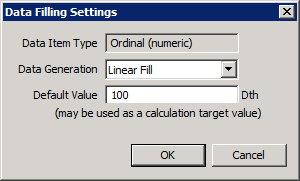
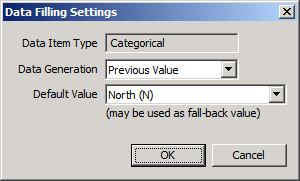
The properties on the Data Filling Settings dialog box are described below.
| Field Name | Description | ||||||||||||||||||||||||||||||
|---|---|---|---|---|---|---|---|---|---|---|---|---|---|---|---|---|---|---|---|---|---|---|---|---|---|---|---|---|---|---|---|
|
Data Item Type |
Data filling settings must be associated with a particular Data Item Type (Ordinal or Categorical). |
||||||||||||||||||||||||||||||
|
Data Generation |
For Ordinal data item types, the available data filling actions include the following:
For Categorical data item types, the available data filling actions include the following:
Note: For any value that is filled, the Filled Value Bit will be set if configured on the System Settings page. |
||||||||||||||||||||||||||||||
|
Default Value |
Enter a Default Value. |


